

Maipu BD-WAN Controller
Maipu Business-driven WAN solution, referred to as Maipu BD-WAN, is the latest generation of SD-WAN solution proposed by Maipu based on the core idea of SDN integration. This solution is aimed at the WAN interconnection scenarios of corporate headquarters and branches, providing a service experience that is superior to traditional WAN technology, and meeting many requirements such as rapid deployment of network services, dynamic traffic scheduling, and network/service visualization, etc.
The solution uses SD-WAN mainstream technology DVPN to build an overlay logical network, supports the smooth migration of traditional wide area networks to intelligent software-defined WAN networks, can carry IPv4/v6 dual-stack service traffic, and is suitable for enterprise network customers in finance, government, energy, transportation, etc., meeting the needs of next-generation wide area network construction.
The solution consists of SD-WAN controller and SD-WAN router. By integrating the resources of the entire network, observing the network status in multiple dimensions, and intelligently analyzing the operation data, the entire network can be visualized at multiple levels and in all directions, and centralized control, global scheduling, and real-time optimization can be performed according to user strategies and service needs. It solves the problems faced by enterprises in the digital transformation of the WAN, such as low automation, low intelligence, network invisibility, and high operation and maintenance costs.
Product Features
BD-WAN Solution Highlights
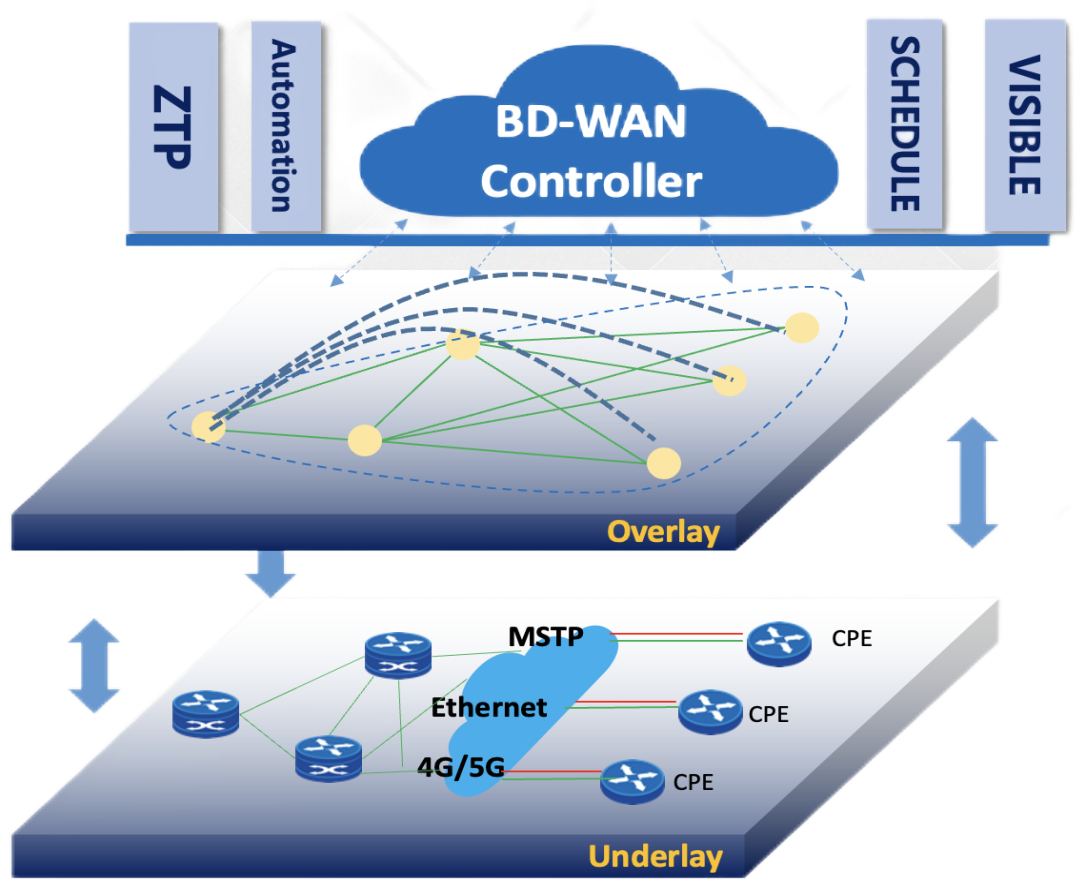
Underlay/Overlay Architecture
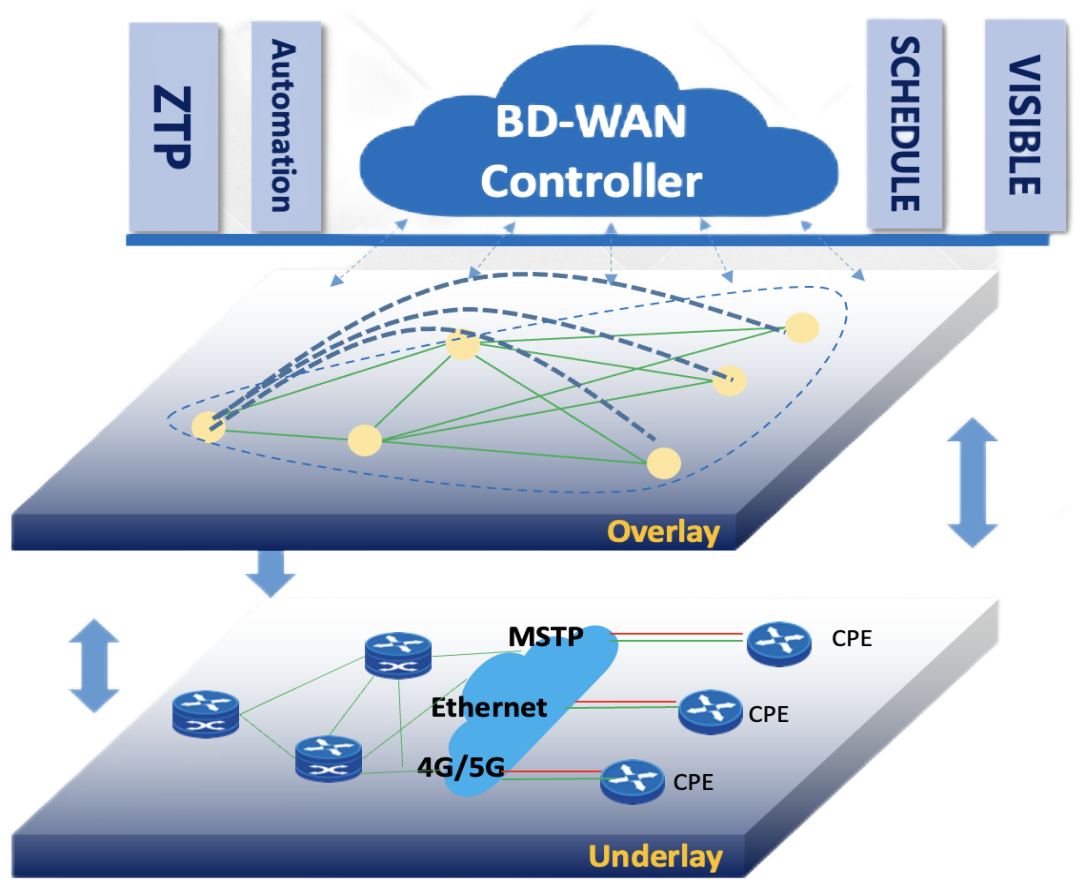
Maipu BD-WAN Solution Architecture
BD-WAN solution supports high reliability. Even after the controller fails, the router will continue to work according to the existing Overlay rules. If the status of the router changes (such as link interruption), it will forward according to the original Underlay rules. When the controller recovers, it recalculates and sends the Overlay rules to the router.
Service Auto Provision
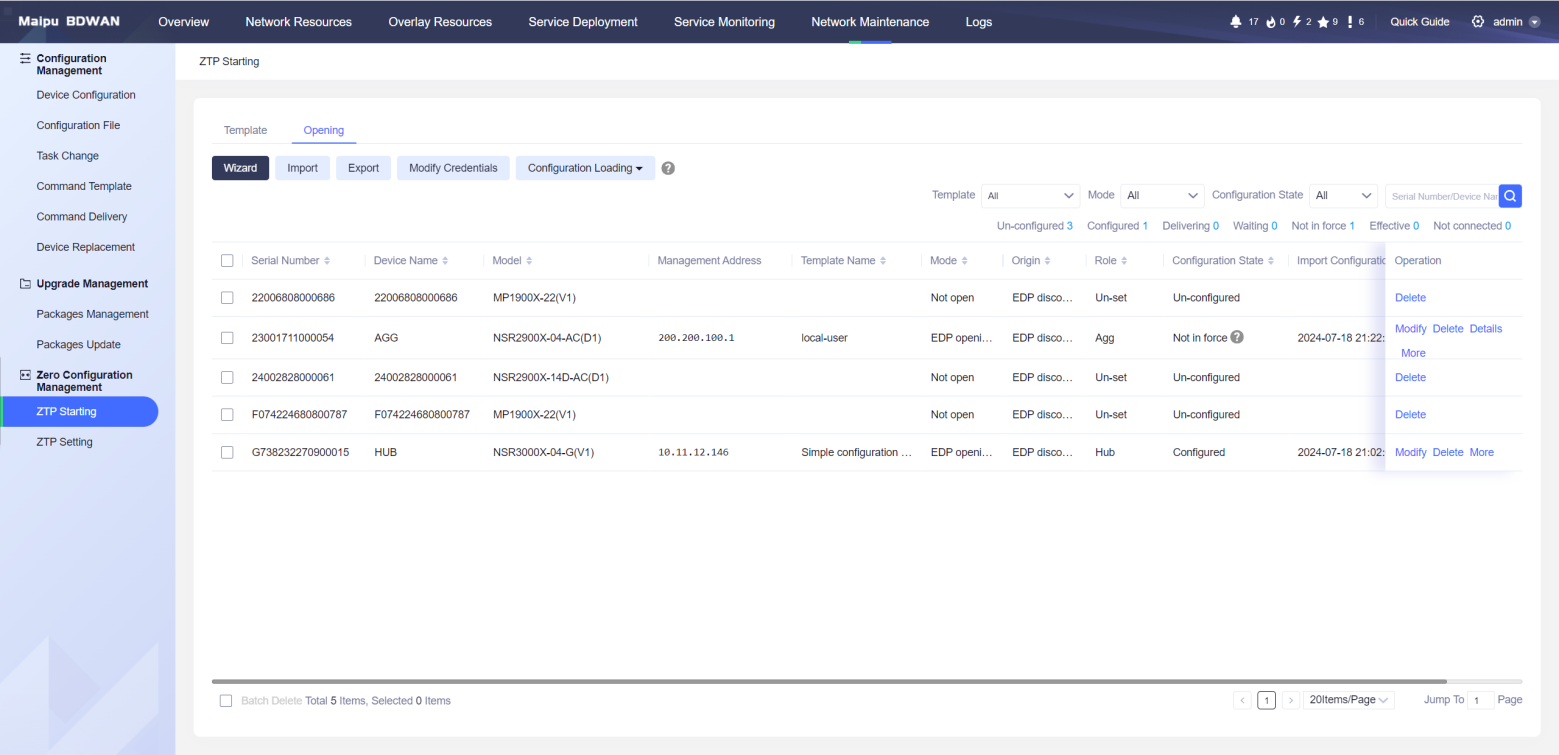
Maipu BD-WAN solution provides a variety of zero-configuration startup methods to help operation and maintenance personnel to complete equipment deployment and network operation and maintenance in a simple, fast and efficient manner. The solution supports multiple zero-configuration startup methods, such as EDPB startup, USB disk startup, email startup, and DHCP startup, for customers to choose according to their needs.
EDP startup is a patented zero-configuration startup technology developed by Maipu for enterprise network scenarios. Through the cooperation between the controller and the router, the edge router can be automatically scanned and discovered by the central router without zero configuration (factory default configuration) and IP address, and the Underlay configurations such as NETCONF, SNMP, and routing protocols can be automatically issued through the controller, so the edge router can be deployed and launched without the need for an administrator to be on duty on site.
The zero-configuration startup tool enables automatic deployment of equipment and services, centralized collection and processing of detailed information on network nodes, remote distribution, upload, and comparison of network node configurations, and remote activation of network node configuration data, saving deployment time and reducing deployment difficulty. The equipment can be truly plug-and-play, achieving zero IT operation and maintenance for branch offices.
Network & Service Orchestration
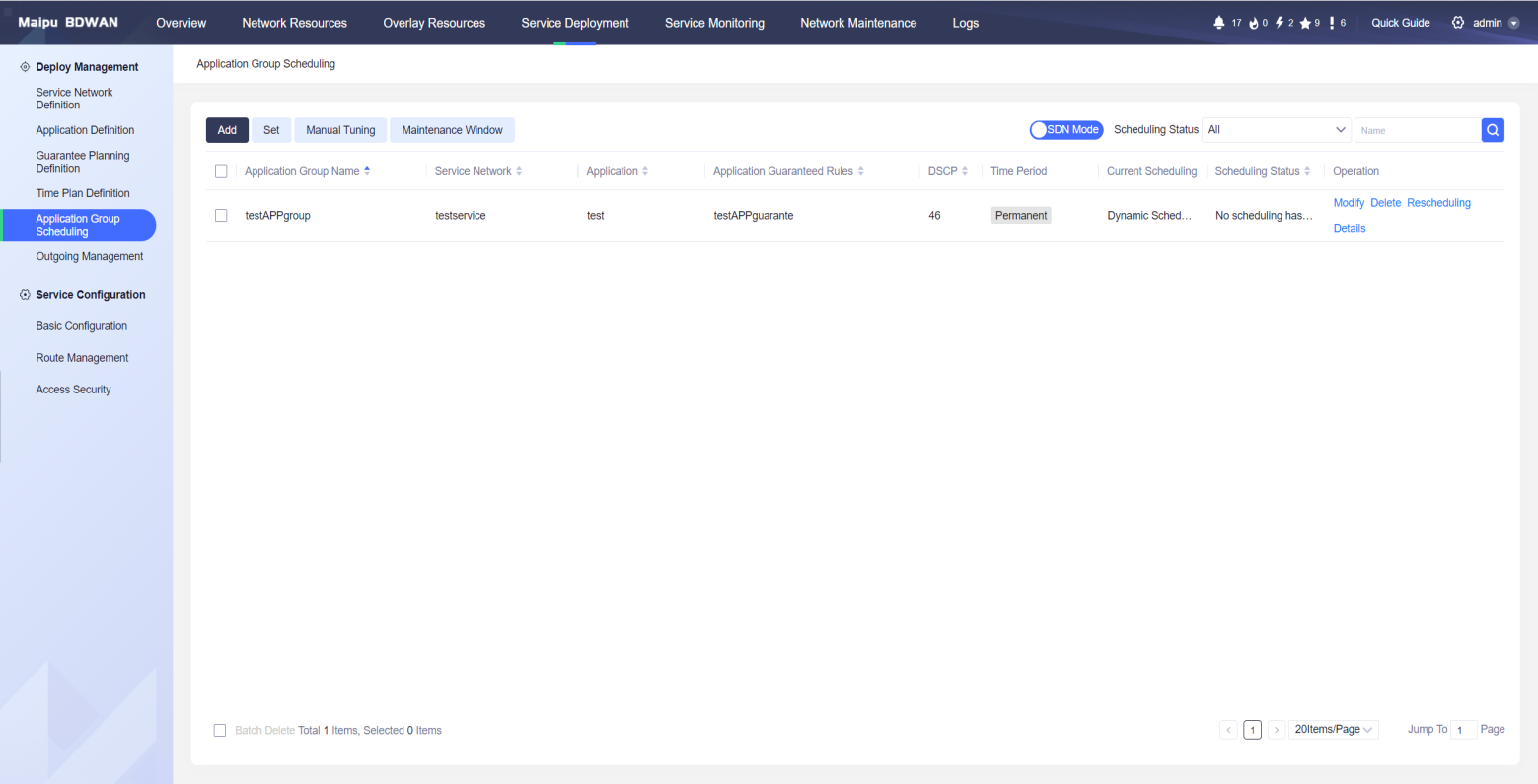
Maipu BD-WAN Service Orchestration
BD-WAN can set up a dedicated scheduling policy based on the link quality characteristics required for each service operation, and intelligently plan the path through the controller. Through real-time detection of the routers of each network node and the link SLA (bandwidth, delay, jitter, packet loss rate, etc.) of the service operation, through rich and flexible scheduling methods, the controller calculates the link quality of the entire network, and then sends control policies to the corresponding routers to select the real-time optimal path for service operation.
BD-WAN supports a variety of network models, without requiring users to significantly adjust the existing network structure and supports two-level networking and multi-level networking. BD-WAN can enable traffic scheduling based on the physical link of the WAN, and supports the division of different logical networks, scheduling the traffic of services in their respective logical networks, and supports the establishment of tunnel traffic scheduling in stages.
Through the intelligent path planning of the whole network, one service has one path to meet the personalized transmission needs of the service. In addition, the optimal path is automatically planned to reduce the difficulty of service deployment.
Networking & Service Visibility
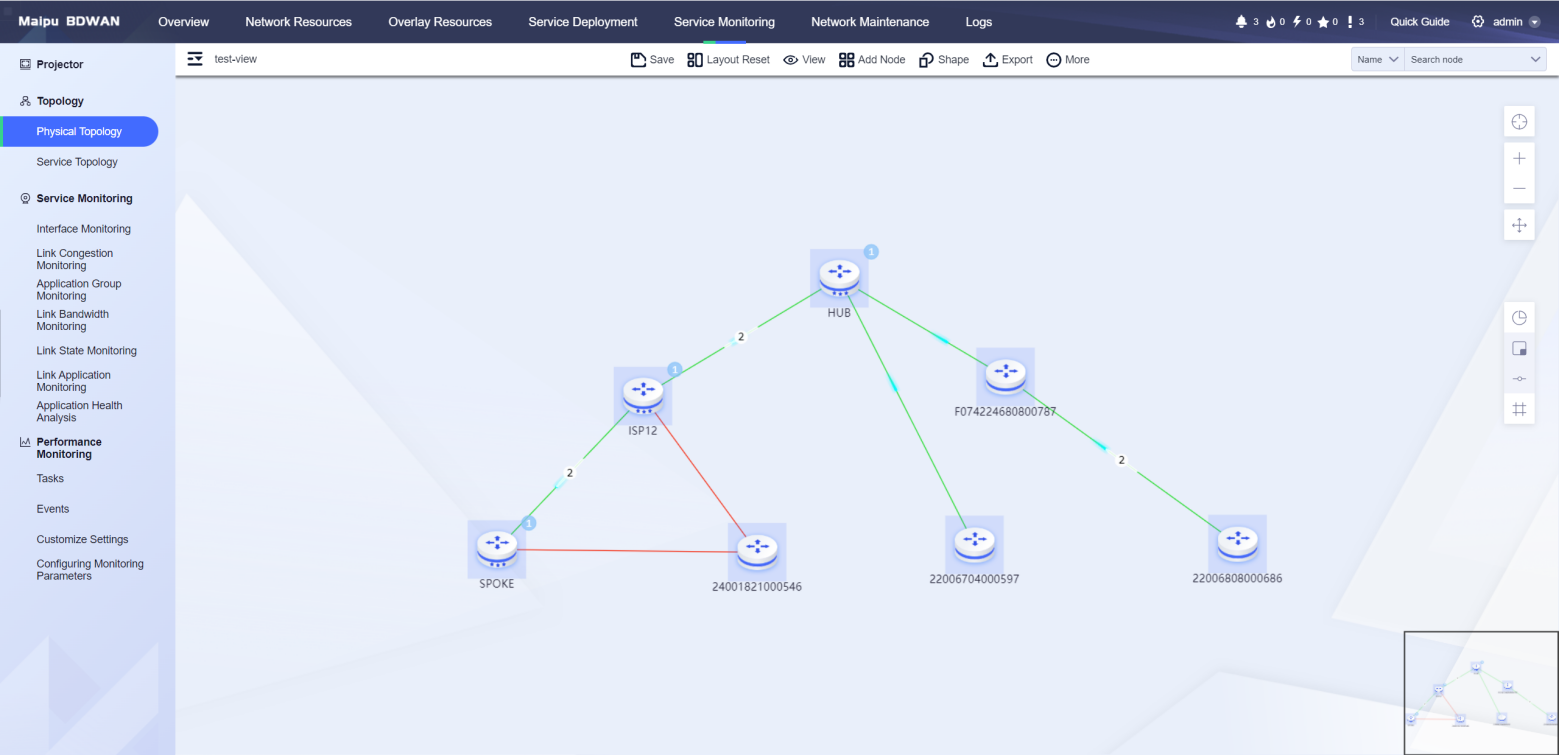
Maipu BD-WAN Overlay Topology
Network visualization: Through the integration of Maipu's patented EDP technology and other technologies, the three-layer topology can be visualized, and the network structure and link information consistent with the actual topology can be displayed on the controller; the detailed information of the WAN link in the network, such as bandwidth utilization, line quality, etc., can also be viewed.
Path visualization: The controller samples the network in real time to present the real-time forwarding path of the service in the network.
Business visualization: Using network devices as probes, traffic information in the network is collected to visualize data flows. Traffic collection can be done in seconds, and the controller supports displaying traffic information of each application, including the real-time and historical bandwidth of the application, as well as the bandwidth share of the application.
Fault visualization: Real-time collection and alarm of device and link status.
Through full network visualization, traditional network nodes and interconnected links in the network can be automatically identified to build the entire network topology. The real-time status of each device, each link, and each service can be clearly understood, providing the necessary conditions for network optimization and troubleshooting.
Service Health Statistics
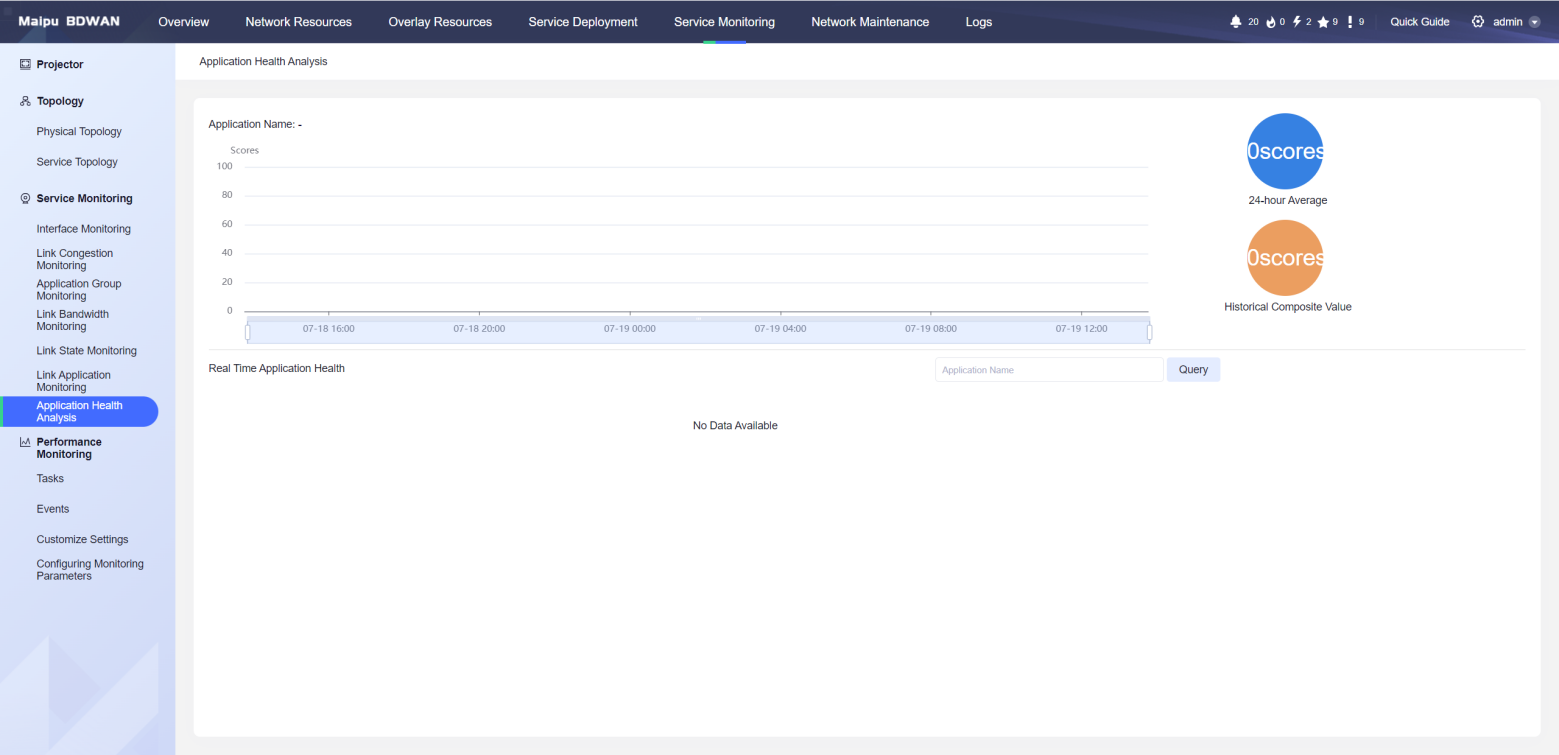
Maipu BD-WAN Service Health Statistics
BD-WAN controller can collect and count the scheduling frequency, scheduling reasons, and scheduling methods of service flows. Based on the statistical results, the service status is analyzed and the analysis results are presented in the form of scores. The current and overall status of the service can be counted, the service health can be rated, and optimization suggestions can be given.
Through service health analysis, customers can understand the matching degree of each service under the current network load. Customers can make decisions based on service health ratings and optimization suggestions for network optimization or expansion. BD-WAN controller can also intelligently predict and pre-schedule burst service data based on service characteristics to avoid network oscillation.
Large-screen Displaying
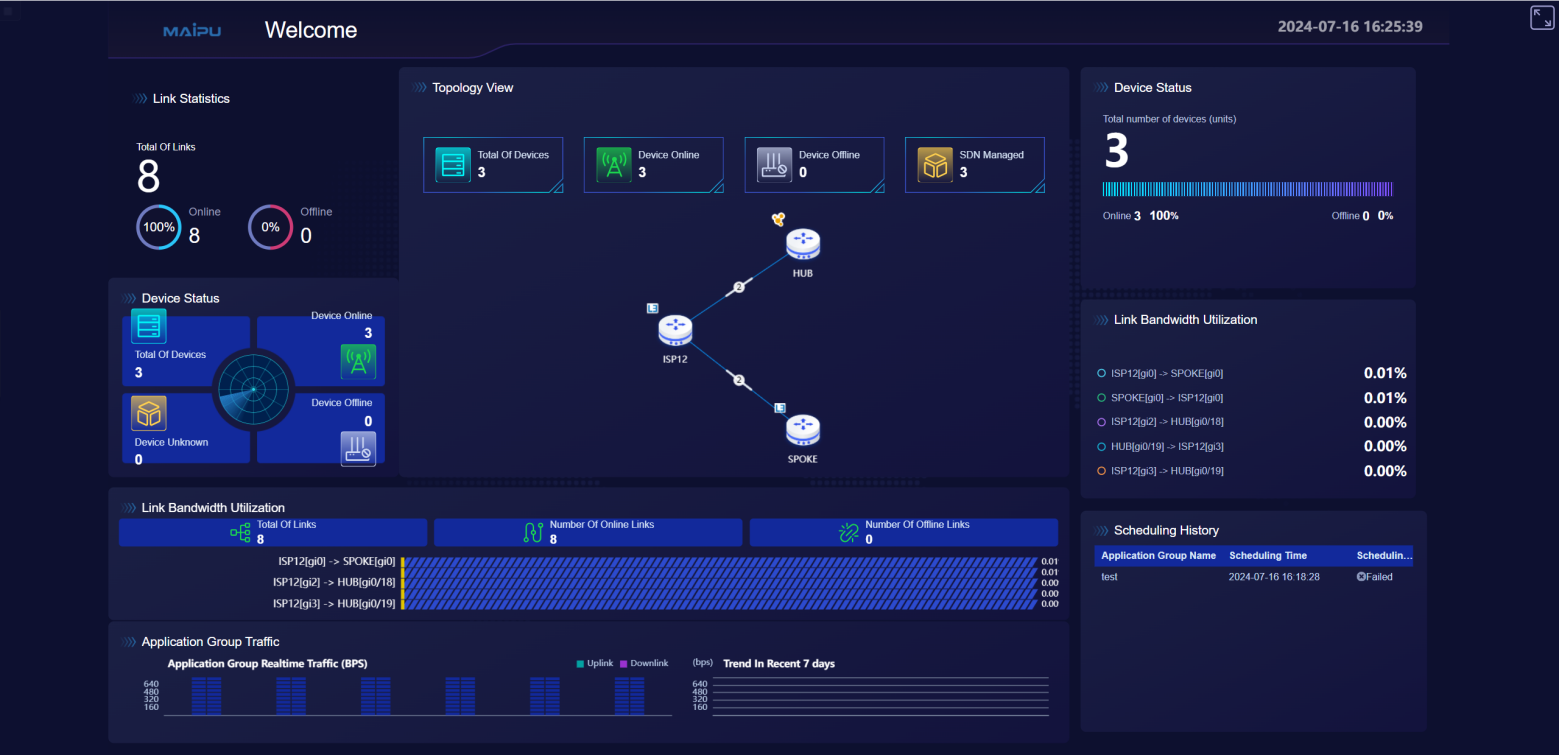
Maipu BD-WAN Large-screen Displaying
The large-screen component presents the overall status of the current network to the user. It can display key network information such as the operating status of the current link, statistical sorting of traffic, and through the intuitive display of each site between the wide area network on the map and detailed information on the link status, users can more easily understand the current network operation status and link usage.
The information displayed on the large screen includes scheduling times, statistics on the operating status of the entire network equipment, link bandwidth utilization, link traffic statistics, service traffic statistics, service health status and traffic scheduling status.
Through large-screen display, customers can be given a more intuitive and vivid presentation of network status, and intuitive, flexible and diverse charts can be used to provide customers with business-driven decision-making support.
Product Specifications
|
Software Features |
|
|
Visualized Operation and Maintenance |
Support large-screen display, showing device geographic location, daily dispatch times, application health, dispatch logs, application traffic and other system monitoring components |
|
Support network topology display, showing the device/link connection relationship and link congestion status in the network |
|
|
Support application traffic statistics and display real-time application traffic |
|
|
Support device interface traffic statistics and display device interface traffic |
|
|
Support application path display, using network devices as the background, and displays the actual application path in the topology based on the service flow |
|
|
Support application health analysis, displays application health scores, and displays key event statistics that affect the scores |
|
|
Device Management |
Support a variety of zero-configuration startup tools, including EDP, USB, email, DHCP, and other startup methods |
|
Support automatic distribution of device configuration, and can distribute device configuration remotely through the controller |
|
|
Support batch import of device configuration Excel, and can batch import device configuration through Excel |
|
|
Support real-time monitoring of link bandwidth, delay, jitter, and packet loss rate, and displays real-time link quality |
|
|
Support automatic discovery of network topology and automatically draws device link relationships in the network topology |
|
|
Support unified management and scheduling of L2 dedicated lines, L3 dedicated lines, 4 /5G links, and Internet lines |
|
|
Support one-click replacement of faulty devices, supports automatic distribution of original device configurations to new devices, and completes rapid launch of new devices |
|
|
Service Planning |
Support service network creation, specify service source and destination nodes, and build overlay network |
|
Support application traffic definition based on quintuple and DSCP |
|
|
Support control protocol packet protection to ensure orderly device management when the link is congested |
|
|
Support link bandwidth allocation through controller interface |
|
|
Intelligent Scheduling |
Support path optimization based on service bandwidth, and can intelligently optimize the forwarding path for the service based on the bandwidth resources of the entire network |
|
Support path optimization based on congestion status, adjusts the service path from the congested link to the idle link, improves link utilization, and improves service quality |
|
|
Support path optimization for link interruption, adjusting the service path from the interrupted link to the available link |
|
|
Support path preemption based on service priority. When the link resources of the entire network are in short supply, link resources are reallocated based on priority to ensure the service quality of high-priority applications. |
|
|
Support service path planning with the same source and destination, ensuring the consistency of service paths and preventing traffic from being blocked by WAN security devices |
|
|
Support selecting the forwarding path that meets the minimum service bandwidth requirement based on the link available bandwidth |
|
|
Support path calculation based on link delay, jitter, packet loss and other constraints, and selects forwarding paths according to service needs |
|
|
Support triggering path calculation and path optimization based on link strategies, and triggering path adjustment when the service traffic exceeds the set link threshold |
|
|
Support setting constraints for switching between primary and backup paths, such as link latency, jitter, packet loss, etc. When the primary path fails or reaches the constraint, traffic automatically switches to the backup path for forwarding |
|
|
Support intelligent scheduling of load balancing based on bandwidth utilization |
|
|
Support service path optimization, regularly adjusts the path based on the initial service quality requirements, recalculates the path after detecting a link failure and restores the optimal service path |
|
|
Support recalculation and restoration of service paths after device failure |
|
|
Support service scheduling log display, showing the time, reason, result, original path and final path of service scheduling |
|
|
High reliability |
Support dual-network bearer, logical isolation of overlay network and underlay network, and can specify service bearer network according to needs |
|
Support network escape. When the controller is abnormal, it can dynamically adjust the forwarding path according to the real-time network situation to ensure the orderly forwarding of service traffic. |
|
|
Support dynamic adjustment of node failures. The controller dynamically adjusts the service path according to the node status to ensure orderly forwarding of service traffic. |
|
|
Support cluster high reliability mode. A single controller can manage 2,000+ network nodes. It supports horizontal expansion. Three controllers can form a cluster environment. Failure of a single node will not affect the stability of the cluster. |
|
|
Autonomous and controllable |
Support autonomous control of the entire network of servers and devices |
|
Management and Operation |
Support logging and output functions |
|
Support direct presentation of fault information in the topology diagram |
|
|
Support E-mail push alarm information |
|
|
Support alarm threshold setting and standard syslog format for sending alarms |
|
|
Support allocating administrator accounts by branch |
|
|
Support controller account decentralization and domain management functions |
|
Typical Application
Dual-level Flat WAN Networking
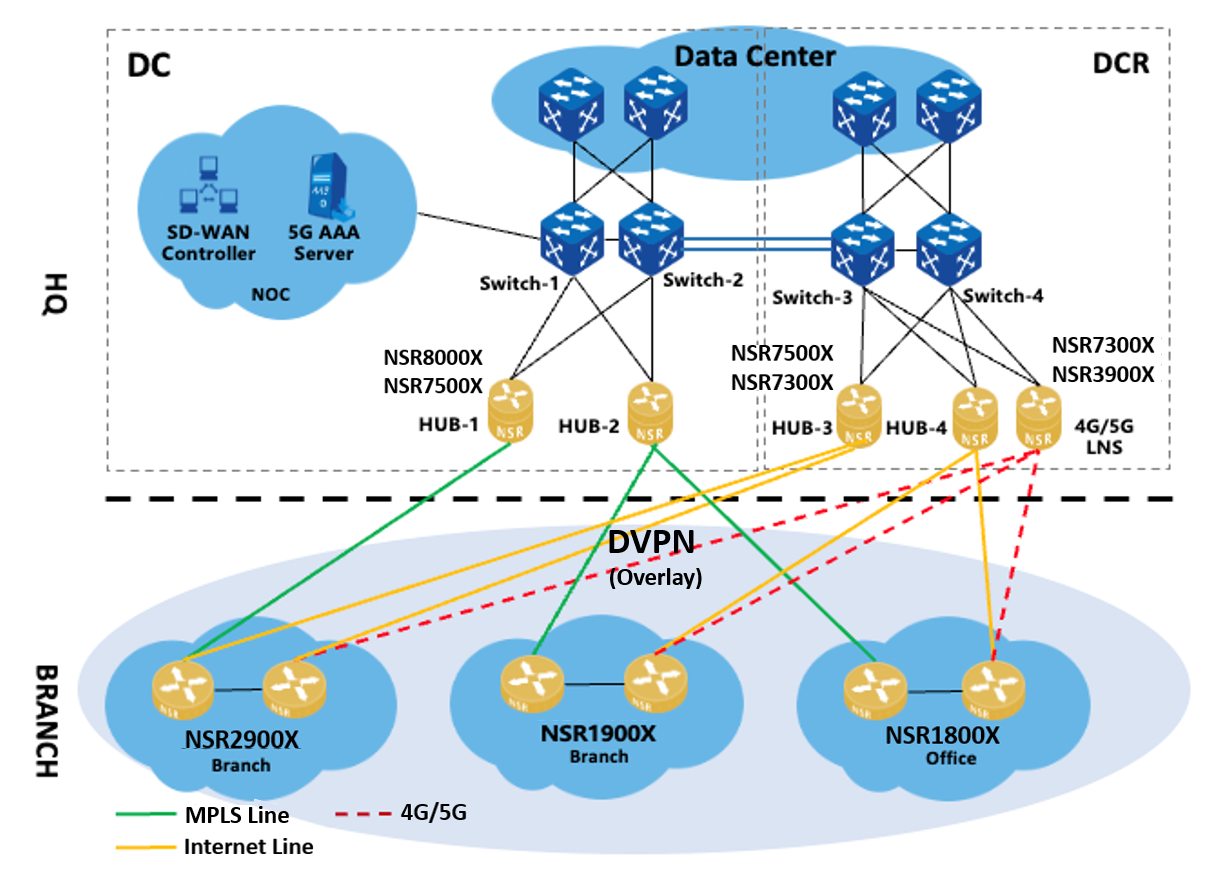
Solution Characteristics
1. In multi-level flat network, the HQ core nodes are dual-device dual-link redundant, the access nodes are directly connected to the core nodes router, the number of site nodes is large, and the locations are dispersed.
2. Each packet Underlay implements traffic diversion and backup on two lines through routing.
3. The 4G/5G line serves as a backup for the wired line. When the wired line fails, the 4/5G line can be used to quickly ensure key services.
Solution Requirements
1. Improve network reliability and ensure the quality of key service services.
2. Automatic deployment and simplified operation and maintenance management.
3. Automatically optimize traffic paths, rationally utilize bandwidth, and improve bandwidth utilization.
4. Network visualization reduces the difficulty of operation and maintenance.
Solution Advantages
1. Rapid service deployment and refined control management to ensure service according to priority.
2. Service routing is performed based on flexible strategies. Network anomalies (link interruption, link degradation, link congestion, node anomalies) can be intelligently optimized to select a more appropriate path to ensure service continuity.
3. Through visual operation and maintenance, the network and service can be monitored in real time, so that the network and service are under full control.
4. Manage devices by groups for easier management.
5. The service is carried on two networks (underlay and overlay dual-plane networks). If the overlay fails, it switches to underlay forwarding.
Order Information
BD-WAN Router Position Introduction
|
Position |
SD-WAN Router Model |
Recommend SD-WAN Sites (with IPSec) |
Recommend SD-WAN Sites(without IPSec) |
Concurrent SD-WAN Flow |
|
BD-WAN Core Router |
NSR8000X(SPU20) |
200-400 Sites |
400-600 Sites |
10Mbps/Site |
|
NSR8000X(SPU05) |
150-200 Sites |
300-400 Sites |
10Mbps/Site |
|
|
BD-WAN Aggregation Router |
NSR7500X(SPU05) |
100-150 Sites |
200-300 Sites |
10Mbps/Site |
|
NSR7300X(SPU05) |
50-100 Sites |
100-200 Sites |
10Mbps/Site |
|
|
NSR3900X-X4 |
1-50 Sites |
1-100 Sites |
10Mbps/Site |
|
|
BD-WAN Access Router |
NSR2900X-14D |
N/A |
N/A |
N/A |
|
NSR1900X-22 |
N/A |
N/A |
N/A |
|
|
NSR1800X-55 |
N/A |
N/A |
N/A |
BD-WAN Router Performance Specification
|
Position |
Router |
SD-WAN Router Model |
1:N L3 Link (1400Byte) |
1:N L3 Link (1400Byte + IPSec) |
|
HQ |
SDWAN Core Router |
NSR8000X(SPU20) |
10.0Gbps |
4.0Gbps |
|
NSR8000X(SPU05) |
4.0Gbps |
1.8Gbps |
||
|
Branch |
SDWAN Aggregation Router |
NSR7500X(SPU05) |
4.0Gbps |
1.8Gbps |
|
NSR7300X(SPU05) |
2.4Gbps |
1.0Gbps |
||
|
NSR3900X-X4 |
2.0Gbps |
900Mbps |
||
|
Office |
SDWAN Access Router |
NSR2900X-14D |
500Mbps |
200Mbps |
|
NSR1900X-22 |
500Mbps |
200Mbps |
||
|
NSR1800X-55 |
500Mbps |
100Mbps |
||
|
Note: 1. The standard service model is used in BD-WAN scenario: DMVPN+PBR+QoS+ACL+BSM. 2. The advanced service model is used in BD-WAN scenario: DMVPN+PBR+IPsec+QoS+ACL+BSM. |
||||
BD-WAN Controller Introduction
|
Controller Model |
Description |
|
Maipu BD-WAN |
Maipu Business-driven controller platform software |
|
BD-WAN |
Maipu Business-driven functional component license |
|
BD-CLS |
Maipu Business-driven cluster function license |
|
BD-WAN-L-1 |
Maipu Business-driven one node device management license |
 :